Utilizing Themed Custom Dashboards from the Anomali Threat Research Team
The Anomali Threat Research (ATR) team creates and maintains custom dashboards to alert you to new and relevant threat intelligence. You can add these dashboards to your home page.
The following dashboards are available:
| Dashboard | Description |
|---|---|
| Anomali Copilot RSS Feeds | Displays alerts related to the latest updates from your active Anomali Copilot RSS feeds. Note: To use the dashboard, an active Anomali Copilot subscription is required. Contact your Anomali Sales representative for details. |
| Anomali Energy Defense Intelligence Channel | Displays alerts about the intelligence received from the Anomali Energy Threat Defense intelligence channel. See Managing Anomali Intelligence Channels for more information about intelligence channels. |
| Anomali Global Security Event Intel - ClopRansomware, MOVEit & DataDirect | Displays alerts about the intelligence received from the Anomali Global Security Event Intel intelligence channel, which highlights ongoing Global Security Event (GSE). For example, MOVEit vulnerability. See Managing Anomali Intelligence Channels for more information about intelligence channels. |
| Anomali Malware Intelligence Channel | Displays alerts about the intelligence received from the Anomali Malware intelligence channel. See Managing Anomali Intelligence Channels for more information about intelligence channels. |
| Anomali Mobile Threat Defense Intelligence Channel | Displays alerts about the intelligence received from the Anomali Mobile Threat Defense intelligence channel. See Managing Anomali Intelligence Channels for more information about intelligence channels. |
| Anomali Targeted Threat Monitoring - Last 90 Days | Provides a feed of Threat Models and observables focused on threats related to your organization and assets. It alerts about suspicious domains, certificate registrations, and leaked credentials detected over the last 90 days. |
| Anomali Threat Research Premium | Displays all intelligence curated or created by ATR. The curated intelligence consists of tactical and strategic intelligence in the form of actor and malware profiles that come by default in ThreatStream. |
| ATTM+ Brand Monitoring - Last 90 Days | Provides a feed of Threat Models and observables focused on threats related to your organization and assets. It includes alerts about leaked codes, documents, suspicious applications, trademark application filing, and fake Twitter account registrations detected over the last 90 days. |
| Covid-19 Indicators | Provides access to Covid-19 observables used by attackers to compromise data and systems, thus allowing analysts to focus on new and relevant events that may impact their organization. |
| CVE-2022 27518 & Known Citrix Vulnerabilities | Displays all intelligence related to Citrix vulnerabilities. |
| DarkSide Ransomware | Displays alerts related to the latest observables executed by the DarkSide group. These threat actors target high-revenue organizations by encrypting and stealing sensitive data, which they threaten to make publicly available if their ransom demand is not paid. |
| Financial Services incl. Anomali FS-ISAO | Highlights all tactical and technical intelligence available in the ThreatStream platform to alert on potential attacks targeting financial sector. For customers subscribed to Anomali FS-ISAO trusted circle, the dashboard also covers intelligence shared in this trusted circle. |
| Health Care and Social Assistance inc. Anomali Health-ISAO | Dispalys alerts related to the Health Care & Social assistance sector intelligence including intelligence that comes from Anomali Health-ISAO trusted circle. |
| Global Activity | Displays all active observables in ThreatStream. This intelligence is based on trending iType, the total amount of indicators for the last 24 hours, 30 days, and 90 days, country of origin, and severity level. Additionally, it displays indicators from such sub-regions of the world as North America, Eastern Asia, Western Asia, and Eastern Europe. |
| Intelligence Insights - For Customers in AMER Region (Last 90 Days) |
Displays observables targeting the AMER region including the observable type, country of origin, and targeted industry. Note: Some dashboard widgets require PDRP subscription. See Anomali Premium Digital Risk Protection (PDRP)for more details.
|
| Intelligence Insights - For Customers in APAC Region (Last 90 Days) |
Displays observables targeting the APAC region including the observable type, country of origin, and targeted industry. Note: Some dashboard widgets require PDRP subscription. See Anomali Premium Digital Risk Protection (PDRP)for more details.
|
| Intelligence Insights - For Customers in EMEA Region (Last 90 Days) |
Displays observables targeting the EMEA region including the observable type, country of origin, and targeted industry. Note: Some dashboard widgets require PDRP subscription. See Anomali Premium Digital Risk Protection (PDRP)for more details.
|
| Iran Cyber Activity | Displays new indicators related to the activities of cyber threat groups based in Iran. The dashboard widgets allow you to further investigate, refine search queries, and export the search results for additional actions. |
| Log4Shell (CVE-2021-44228) and variants: CVE-2021-45046, CVE-2021-45105, CVE-2021-4104, and CVE-2021-44832 | Provides alerting and retrospective lookup capabilities to detect and contextualize matches for observables related to Log4Shell and its variants. |
| Malware Intelligence - Ransomware | Pulls OSINT and primary intelligence feeds related to ransomware samples, actors who use ransomware, and TTPs associated with known ransomware families. |
| Malware Intelligence - Remote Access Tools and Trojans | Pulls OSINT and primary intelligence feeds related to remote access tool and trojan samples, actors who use these tools and trojans, and TTPs associated with known remote access tool and trojan families, and displays the data in 10 widgets. |
| Middle East Conflict: APT & Adversary Activity Monitor | Tracks nation-state and APT activity in the context of escalating tensions in the Middle East and the broader geopolitical landscape. The dashboard monitors threat activity from established APT-associated nations (Iran, Russia, China, and North Korea), as well as activity targeting conflict-relevant geographies, including Israel, Palestine, the United States, GCC member states, and allied or potentially impacted nations. |
| Middle East Conflict: Iran-Israel-USA Cyber Threat Monitor | Provides real-time threat intelligence coverage of the cyber dimensions of the ongoing Iran–Israel–USA military conflict, initiated with joint US-Israeli strikes on Iran. |
| Middle East IOCs and TBs | Displays intelligence targeting Middle East. |
| Mummy Spider (TA542, Emotet) | Provides immediate access and visibility into all known Mummy Spider and Wizard Spider observables made available through commercial and open-source threat feeds that users manage on ThreatStream. Mummy Spider conducts its malicious activity using information-stealing malware, Emolet, which is delivered via the TrickBot organized by the Wizard Spider group. |
| Russian Cyber Activity | Provides immediate access and visibility into all known Russian government-related observables made available through commercial and open-source threat feeds that users manage on Anomali ThreatStream. It is focused on seven threat actor groups: Berserk Bear, Cozy Bear (APT29), Fancy Bear (APT28), Gamaredon (Primitive Bear), Turla (Venomous Bear), Voodoo Bear (Sandworm), and Evil Corp (Dridex, Indrik Spider). |
| Sunburst Backdoor | Displays observables related to Sunburst Backdoor, a trojanized version of a SolarWinds plugin containing a backdoor that communicates to third-party servers via HTTP. |
| Threat Actor Monitoring - China-Based Actors | Alerts and provides visibility into the latest cyber attacks conducted by China-based threat actors. |
| Vulnerabilities & Exploits | Includes information on vulnerabilities and exploits that attackers may use to compromise the systems and data of your organization. |
| Wizard Spider (TrickBot, UNC 1878) | Displays intelligence related to Wizard Spider actor. |
Adding Themed Custom Dashboards to Your Home Page
The process of adding ATR dashboards to your home page is identical to that of custom dashboards made by members of your organization.
You can add up to five custom dashboards to your home page. ATR dashboards count toward this limit.
To add ATR dashboards to your home page:
- Click Dashboard in the top navigation menu.
- Click + Add Dashboard.
-
On the Add Existing tab of the Create a New Dashboard window, select the dashboard you want to add to your home page. ATR dashboards display Anomali Threat Research and an Anomali logo in the Created By column.
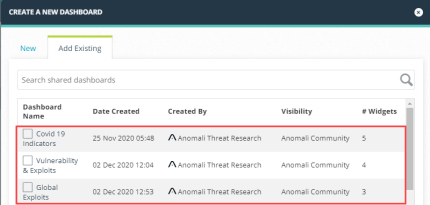
- (Optional) Select Set as Default Dashboard if you want the dashboard to launch automatically each time you navigate to the Dashboard page. Default dashboards refresh automatically every 30 minutes.
- Click Add.
The shared dashboard is added to your home page.
Cloning Themed Custom Dashboards
You can clone themed custom dashboards from the ATR team for the purpose of creating customizable versions.
To clone a shared dashboard:
- Click Dashboard in the top navigation menu.
-
Navigate to the themed custom dashboard you want to clone.
Note: To clone a themed custom dashboard, it must first be added to your home page. Additionally, the Clone Dashboard action is unavailable when you have the maximum ten custom dashboards added to your home page. - Click Clone Dashboard in the Actions menu.
- Enter a Dashboard Name.
- Specify a Visibility setting for the cloned dashboard. Dashboards can be visible only to you (Private) or shared with other users in your organization (My Organization).
- (Optional) Select Set as Default Dashboard if you want the new dashboard to launch automatically each time you navigate to the Dashboard page. Default dashboards refresh automatically every 30 minutes.
- Click Save.
You are directed to the cloned dashboard. Edit Dashboard and Add Widget are now available actions in the Actions menu.
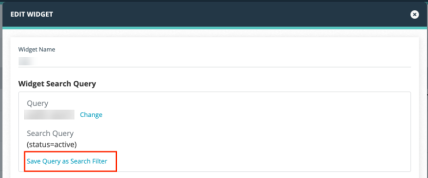
After saving the search filter, you can edit it using the instructions in Managing Saved Search Filters.